Garistengah: Elevating Your Designs with Classic Texture
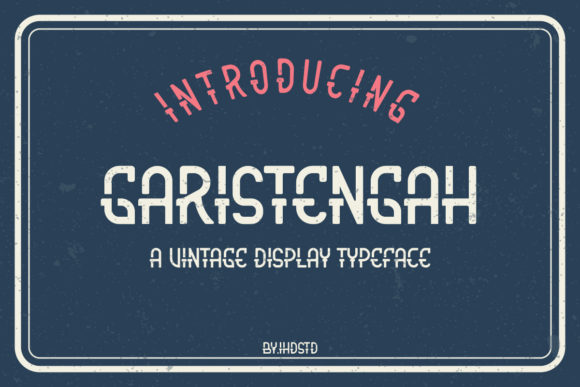
When you are looking for a typeface that commands attention without shouting, Garistengah is often the missing piece in your design puzzle. It is not just another sans-serif font; it is a cool, rough-textured display font that brings a distinct tactile quality to digital and print projects. If you have been searching for a way to add character to your branding, labels, or handmade cards, understanding how to properly utilize Garistengah can make the difference between a generic look and a memorable identity.
Many designers and hobbyists overlook the nuance of textured fonts. They assume any "grunge" or "rough" typeface will do, but the execution matters immensely. Garistengah stands out because its texture is balanced—it provides visual interest without compromising legibility. However, using it effectively requires more than just dragging and dropping it into your design software. There are common pitfalls that can ruin the aesthetic appeal of this classic display font if you are not careful.
Understanding the Aesthetic Appeal of Garistengah
Before diving into technical applications, it helps to understand why Garistengah resonates with such a wide audience, from freelance graphic designers to small business owners running Etsy shops. The font’s name suggests an exotic or perhaps handcrafted origin, and visually, it delivers on that promise. The rough edges mimic the feel of stamped ink, weathered wood, or vintage paper, which adds an immediate layer of authenticity to any project.
This characteristic makes it particularly powerful for:
- Branding and Logos: For businesses that want to appear established, rugged, or artisanal, Garistengah provides instant credibility.
- Labels and Packaging: Whether you are labeling homemade jams or packaging organic skincare, the texture communicates natural ingredients and care.
- Crafting and Stationery: Invitations, wedding cards, and greeting cards benefit from the personal, human touch that this font conveys.
The key here is context. Garistengah is a display font, meaning it is designed to be read at larger sizes. It is not intended for body text. Recognizing this distinction is the first step toward avoiding common design errors.
Common Mistakes When Using Textured Display Fonts
Even experienced creators can stumble when working with fonts like Garistengah. The most frequent error is overuse. Because the texture is so prominent, it naturally draws the eye. If you use it for long paragraphs or dense blocks of information, you risk overwhelming the reader. This leads to cognitive fatigue, where the audience struggles to process the message because their eyes are constantly adjusting to the irregular edges of the letters.
Another significant mistake is ignoring contrast. Since Garistengah has a heavy visual weight due to its texture, pairing it with other busy or complex fonts creates chaos. Similarly, placing it on a cluttered background can cause the text to disappear entirely. You might think the font looks cool on its own, but in a real-world application, poor contrast can render your communication ineffective.
The Legibility Trap
It is tempting to use textured fonts for headlines because they look edgy. However, if the texture is too aggressive, it can obscure the letterforms. With Garistengah, the balance is generally good, but scaling issues can still arise. If you stretch the font horizontally or vertically without adjusting the tracking (letter spacing), the rough texture can become distorted, looking messy rather than stylish. Always maintain the original proportions unless you have a specific artistic reason to distort them, and even then, proceed with caution.
Practical Advice for Better Results
To get the most out of Garistengah, you need to treat it as a partner in your design, not the sole focus. Here are practical strategies to ensure your projects look professional and polished.
Pairing with Simplicity
The best way to showcase Garistengah is to pair it with clean, simple typography. Use a minimal sans-serif or a delicate serif for secondary information, such as dates, locations, or descriptions. This creates a hierarchy that guides the viewer’s eye. For example, if you are designing a menu for a coffee shop, use Garistengah for the item names and a clean, thin sans-serif for the prices and ingredient lists. This approach ensures that the brand personality shines through while maintaining readability.
Color and Background Selection
Consider the environment where your design will live. Garistengah works exceptionally well on earthy tones like kraft paper brown, olive green, or deep navy. Avoid neon colors or overly bright backgrounds, as they can clash with the classic, somewhat rustic vibe of the font. If you are printing physical materials, test your color choices under different lighting conditions. A texture that looks subtle on a screen might become muddy in print if the ink density is too high.
Spacing and Layout
Give your text room to breathe. Increase the line height (leading) when using Garistengah to prevent the rough edges of one line from colliding with the ascenders or descenders of the line below. Tight spacing can make the texture feel cramped and chaotic. By adding white space around your headline, you allow the unique characteristics of the font to stand out without competing with other elements.
Evaluating Your Choice Before You Commit
Before finalizing a design decision, take a moment to evaluate whether Garistengah is truly the right tool for the job. Ask yourself these questions:
- Is the message clear? Step back from your screen or mockup. Can you read the main point within three seconds? If not, the font might be overpowering the content.
- Does it fit the brand voice? Garistengah is cool and classic, but it may not suit a futuristic tech startup or a playful children’s brand. Ensure the font aligns with the emotional tone you want to convey.
- Will it scale? Test your design at various sizes. Does it remain legible on a mobile screen? Will it look crisp when printed on a small product label?
By asking these questions, you avoid costly reprints and redesigns. It also ensures that your creative efforts result in effective communication rather than just visual noise.
Conclusion on Usage
Garistengah is a versatile and stylish choice for anyone looking to add a touch of classic roughness to their work. Its ability to elevate crafting ideas, branding, and labels is undeniable, provided it is used with intention. By avoiding common mistakes like overuse, poor contrast, and improper scaling, you can harness the full potential of this font.
Remember that good design is about balance. Let Garistengah provide the character, but rely on clean layout, appropriate pairing, and thoughtful color choices to create a cohesive and professional result. Whether you are a seasoned professional or a beginner exploring the world of typography, taking the time to understand how this font works will pay off in the quality and impact of your final projects.