Whitechalk: Integrating Authentic Typography into Professional Design Workflows
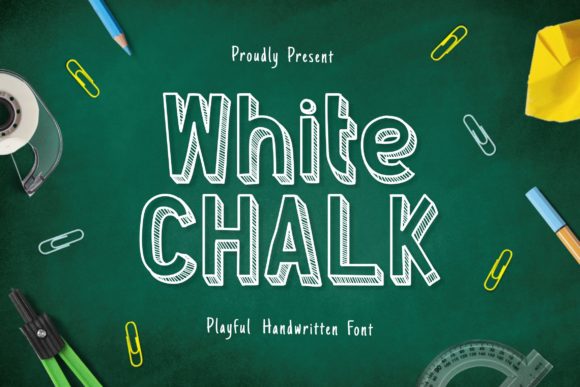
In the landscape of digital design, typography is rarely just about readability; it is a primary vehicle for tone, atmosphere, and emotional resonance. For professionals ranging from educational content creators to boutique brand marketers, selecting the right typeface can be the difference between a flat, generic output and a piece of work that feels tangible and human. This is where Whitechalk enters the workflow. It is not merely a font; it is a stylistic tool designed to replicate the authentic, slightly imperfect texture of chalk on a blackboard or slate. Its unique design allows designers to inject a personal, realistic feel into projects that require warmth, approachability, or an artisanal aesthetic.
Understanding how to integrate Whitechalk effectively requires moving beyond simple insertion. It involves understanding the psychological impact of its texture, planning its usage within broader visual hierarchies, and ensuring compatibility across various platforms. This article explores the practical application of Whitechalk in professional settings, offering insights into preparation, execution, and long-term consistency.
The Psychology of Texture in Digital Spaces
Before diving into technical implementation, it is crucial to understand why a designer would choose a display font with such specific textural qualities over a standard sans-serif or serif. In an era dominated by clean, minimalist interfaces, a "perfect" font can sometimes feel sterile or overly corporate. Whitechalk disrupts this perfectionism. The slight irregularities in stroke width and the simulated dust particles mimic the physical act of writing by hand. This triggers a subconscious association with learning, creativity, and personal touch.
For educators creating teaching materials, this authenticity builds trust. Students are more likely to engage with content that feels curated by a person rather than generated by a system. Similarly, for small business owners in the food, craft, or hospitality sectors, Whitechalk communicates craftsmanship. It suggests that the product behind the design was made with care, much like the letters were written with chalk. When integrating this font into your workflow, consider the emotional goal of the project. If the objective is clarity and speed, a geometric sans-serif may serve better. If the objective is connection and atmosphere, Whitechalk becomes a strategic asset.
Preparation and Asset Management
Effective workflow management begins before the design software is even opened. Proper preparation ensures that when you do use Whitechalk, it integrates seamlessly without causing technical bottlenecks. The first step in this phase is verifying the licensing and file formats. Display fonts often come in various weights and styles, but they also require specific licensing agreements depending on whether the end use is digital web embedding or print production. Ensure you have acquired the correct license for your intended platform to avoid legal complications later in the process.
Once licensed, organize the font files within your system’s asset library. Many design tools allow for custom font folders or cloud-synced libraries. By categorizing Whitechalk under a specific tag such as "Display," "Textured," or "Handwritten," you reduce search time during active projects. Furthermore, check for compatibility with your primary operating system and design suite. While modern systems handle most OpenType and TrueType formats well, testing the font in your specific version of Adobe Creative Cloud, Figma, or Canva ensures that ligatures and special characters render correctly. This preliminary step prevents frustrating delays during the creative execution phase.
Implementation in Educational and Instructional Materials
One of the most robust use cases for Whitechalk lies in the creation of instructional content. Whether you are designing slide decks for corporate training, worksheets for online courses, or social media graphics for a tutoring service, the font serves as a visual anchor for engagement. However, implementation requires careful consideration of legibility. Display fonts, by nature, are less readable at small sizes due to their complex textures.
- Hierarchy Construction: Use Whitechalk exclusively for headlines, titles, or key pull-quotes. Pair it with a highly legible body font, such as a neutral sans-serif, to maintain readability for longer passages of text.
- Contrast Management: The effectiveness of Whitechalk relies heavily on background contrast. On dark backgrounds, ensure the white chalk effect has sufficient luminance. On light backgrounds, consider using a darker variant or adding a subtle drop shadow to prevent the text from blending into the canvas.
- Spatial Planning: Chalk writing naturally occupies space differently than printed text. Allow for generous padding around Whitechalk elements. Crowding the text diminishes its artistic impact and reduces accessibility.
By treating Whitechalk as a headline element rather than a body text solution, you preserve its unique character while maintaining the functional integrity of your educational materials. This balanced approach ensures that learners receive information clearly while being visually engaged by the presentation style.
Integration into Marketing and Brand Identity
For marketers and entrepreneurs, Whitechalk offers a way to humanize a brand identity. In a feed filled with polished stock photography and rigid grid layouts, a textured font stands out. It signals a break from the algorithmic norm. When integrating this font into marketing campaigns, consistency is key. Define clear guidelines on when and how Whitechalk appears in your brand assets.
Consider the seasonal nature of chalkboard aesthetics. They are particularly effective for limited-time offers, event announcements, or seasonal promotions. For example, a bakery might use Whitechalk for weekly specials, evoking the feeling of a daily menu board outside the shop. A tech startup might use it sparingly for blog post headers to suggest innovation rooted in fundamental principles. The key is restraint. Overusing a strong display font can lead to visual fatigue. Use it to highlight, not to dominate.
Furthermore, think about cross-platform consistency. A design that looks great in Photoshop must translate well to mobile screens. Test Whitechalk at various resolutions. The fine details of the chalk texture may pixelate on low-resolution displays if not rasterized correctly or if the vector paths are too intricate. Exporting high-DPI versions for print and optimized web formats for digital use ensures that the quality remains high throughout the customer journey.
Quality Control and Long-Term Maintenance
As projects evolve, so do the needs of the design team. Regularly reviewing the usage of Whitechalk helps maintain quality control. Are the kerning issues consistent? Do the special characters align with the rest of the typographic system? Periodic audits of your design templates can reveal opportunities for refinement. If you notice that Whitechalk is clashing with other brand colors, adjust the palette rather than forcing the font to adapt.
Additionally, stay updated with any new releases or updates from the font foundry. Type designers occasionally refine their work, fixing minor rendering bugs or adding new weights. Keeping your local installation synchronized with the latest version ensures access to the best possible iteration of the font. This attention to detail reflects professionalism and respect for the craft.
Conclusion
Whitechalk is more than a decorative choice; it is a strategic element in the designer’s toolkit. By understanding its strengths, respecting its limitations, and integrating it thoughtfully into workflows, professionals can create designs that resonate on a deeper level. Whether you are teaching a class, launching a product, or sharing a personal story, the authentic look of Whitechalk adds a layer of realism and warmth that standard fonts often lack. Approach its usage with intention, plan for its integration carefully, and execute with precision to achieve outcomes that are both beautiful and effective.