Letted: A Strategic Approach to Display Typography for High-Impact Design
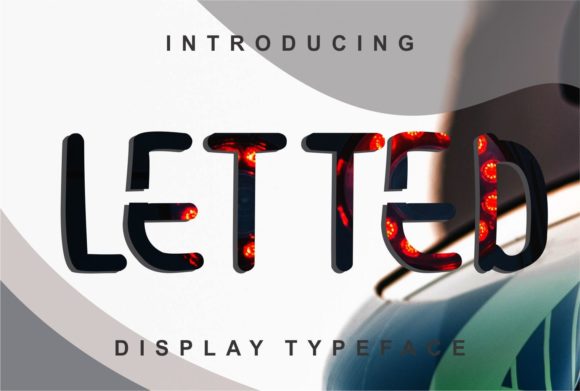
In the landscape of visual communication, typography is rarely just about readability; it is about authority. For professionals, marketers, and creators who need to capture attention in a fragmented digital and physical environment, the choice of typeface is a critical decision that precedes any layout or color selection. Letted emerges as a clean and adaptable display font designed specifically for high-visibility applications. Unlike body text fonts that prioritize endurance over long reading sessions, Letted is engineered for immediate impact, making it an essential asset for posters, flyers, and print materials where legibility at a distance and aesthetic sharpness are paramount.
This article explores how to integrate Letted into your design workflow, focusing on practical implementation, compatibility with broader creative processes, and strategies for maintaining consistency across various media. By understanding the structural advantages of this font, you can streamline your production pipeline while ensuring your final output meets professional standards for quality and clarity.
Understanding the Role of Display Fonts in Workflow
Before diving into the specific attributes of Letted, it is necessary to contextualize its role within the broader design process. In many professional workflows, particularly those involving marketing collateral or event promotion, the hierarchy of information must be established quickly. This is where display fonts differ fundamentally from sans-serif or serif body fonts. They serve as the primary hook, drawing the viewer in before they engage with supporting details.
Letted fits into this niche by offering a balance between modern minimalism and structural robustness. Its clean lines reduce visual noise, allowing the message to take center stage. For freelancers and small business owners who often wear multiple hats—acting as both designer and project manager—using a font like Letted reduces cognitive load. You do not need to spend excessive time adjusting kerning or searching for a "perfect" alternative because the font’s inherent adaptability handles much of the heavy lifting. This efficiency translates directly into faster turnaround times for projects, a crucial factor when dealing with tight deadlines or last-minute client revisions.
Preparation and Asset Management
Effective integration of any new typeface begins with proper preparation. Before opening your design software, ensure you have a systematic approach to managing font assets. This involves verifying license agreements, organizing files in a dedicated typography folder, and testing the font across different operating systems to prevent substitution errors during export.
- License Verification: Confirm whether the license covers commercial use for print and digital media. Letted is versatile, but understanding the scope of usage prevents legal complications later.
- File Organization: Store the font files (OTF/TTF) in a cloud-synced directory. This ensures accessibility for team members and consistency across different workstations.
- Preview Testing: Create a simple test document to view the font at various sizes. Display fonts can sometimes reveal rendering issues at small scales or low resolutions that are not apparent in large headers.
Implementation Strategies for Print and Digital Media
Letted is described as a clean and adaptable display font, which suggests it performs well in diverse contexts. However, optimal results require strategic implementation. The following sections detail how to leverage its characteristics for maximum effect in posters, flyers, and other print materials.
Optimizing for Poster Design
Posters rely on bold, declarative statements. When using Letted for poster headlines, consider the following technical adjustments:
- Scale and Hierarchy: Use the boldest weights of Letted for the main title. Reserve lighter weights for subtitles or dates. This creates a clear visual path for the eye, guiding the viewer from the most important information to the secondary details.
- Contrast Management: Because Letted has clean lines, it pairs exceptionally well with high-contrast backgrounds. Avoid placing light gray text on white backgrounds; instead, use deep blacks or vibrant colors against neutral backdrops to maintain legibility.
- Kerning Adjustments: Even with a well-designed font, manual kerning may be required for very short words or acronyms. Check for uneven gaps between letters, especially when setting text in all caps.
Flyer Layouts and Information Density
Flyers often contain more information than posters, requiring a delicate balance between display elements and body copy. Letted can serve as the anchor for these layouts, providing structure without overwhelming the reader.
When designing flyers, use Letted for section headers or call-to-action buttons. Its adaptability allows it to blend seamlessly with smaller body fonts, such as a classic sans-serif or a readable serif. This combination ensures that while the headline grabs attention, the informational content remains accessible. For educators and bloggers creating promotional materials for workshops or webinars, this dual-function approach helps maintain professionalism while keeping the design engaging.
Compatibility and Integration with Other Tools
No design exists in a vacuum. Letted must interact effectively with other tools, resources, and platforms in your workflow. Understanding these interactions is key to avoiding common pitfalls.
Color Palette Synergy
The clean nature of Letted makes it highly compatible with a wide range of color palettes. However, certain combinations yield better results depending on the medium:
- Monochromatic Schemes: Using varying shades of a single color with Letted creates a sophisticated, unified look. This is ideal for corporate events or minimalist product launches.
- Complementary Colors: If you want to create energy, pair Letted with complementary colors. The starkness of the font will ground the vibrancy of the colors, preventing the design from feeling chaotic.
- Texture Overlays: When applying textures or patterns behind the text, ensure the contrast remains high. Letted’s thin strokes might get lost in complex backgrounds, so consider adding a subtle drop shadow or solid backing layer.
Digital vs. Print Output
One of the most critical aspects of implementation is ensuring the font renders correctly across different output methods. While Letted looks stunning in print, digital displays have different resolution requirements.
Print Preparation: Always convert text to outlines or embed fonts when sending files to printers. This guarantees that the recipient sees exactly what you intended, regardless of their system fonts. Additionally, check the DPI (dots per inch) settings; 300 DPI is standard for high-quality print.
Digital Optimization: For web use or social media graphics, consider converting the text to images only if necessary. However, for best SEO and accessibility practices, keep text as selectable HTML/CSS where possible. If using Letted as a web font, ensure you are using the correct file formats (WOFF/WOFF2) for cross-browser compatibility. Note that some display fonts may not have web licenses, so verify this before implementing Letted on a live website.
Quality Control and Long-Term Consistency
Maintaining quality control is essential for building brand recognition. If you plan to use Letted for ongoing projects, such as a series of monthly newsletters or recurring event flyers, establishing a style guide is crucial.
Creating a Style Guide
A style guide documents how Letted should be used. Include specifications for:
- Minimum Size: Define the smallest size at which Letted remains legible. This prevents accidental use in contexts where it would fail.
- Pairing Fonts: Specify which body fonts complement Letted in your specific brand identity. This ensures consistency even if different designers work on the same project.
- Spacing Rules: Document preferred tracking and leading values. Consistent spacing contributes to the professional feel of the final output.
Reviewing for Clarity
Before finalizing any design, perform a clarity check. Step away from the screen or printout and return after a break. Ask yourself: Is the message clear? Does the font enhance or distract from the content? With Letted, the goal is usually enhancement through clarity. If the font feels too aggressive or too subtle, adjust the weight or size rather than changing the typeface entirely.
Conclusion: Maximizing Potential Through Practical Application
Letted offers a robust solution for designers seeking a clean, adaptable display font. Its strength lies not just in its aesthetic appeal but in its ability to fit seamlessly into structured workflows. By approaching its implementation with careful preparation, strategic layout planning, and rigorous quality control, professionals can leverage Letted to produce high-impact posters, flyers, and print materials.
Whether you are a solo entrepreneur launching a new product or a marketing team coordinating a large-scale campaign, integrating Letted into your toolkit can streamline your creative process. Focus on the practical aspects of usage—licensing, pairing, and output optimization—and you will find that this font provides endless possibilities for clear, effective communication. Start by testing it in your next project, observe how it interacts with your existing assets, and refine your approach based on the outcomes. In design, as in planning, the best results come from thoughtful execution and continuous adaptation.